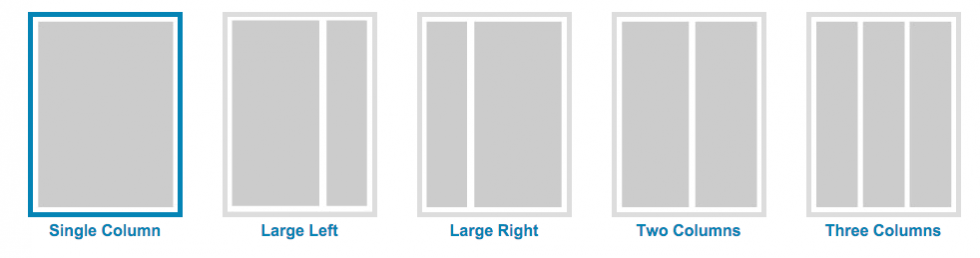
You can change the Layout of your page at any time.
The page content (widgets) will adjust to fit into the new column layout.
You may need to move around some widgets.
On mobile devices / small screens the website will automatically scale down to a single column.
Page Layouts available
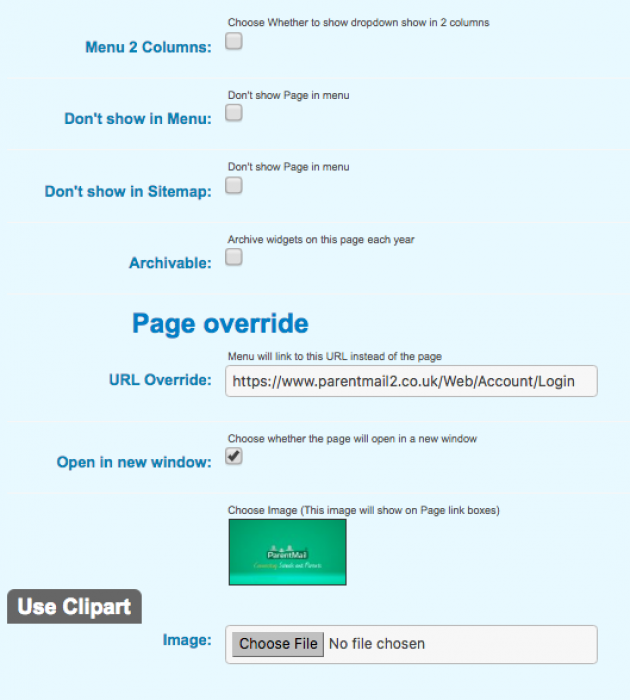
Extra Options
Menu 2 Columns: Choose Whether to show dropdown show in 2 columns
Don't show in Menu
Don't show in Sitemap
Archivable
URL Override: Menu will link to this URL instead of the page
Open in new window:
Choose whether the page will open in a new window
Image: Add an image for your page to be used when page links widget 'show as boxes' option is used
Title: Change the text used to identify the page in google
Position Under: Choose the page that your new page will show under. Leave blank to show in main menu
Blank Page: Choose to start from scratch with a blank page and build it up working with widgets
Search Engine Optimisation:
- Meta Description
- Meta Keywords
Extra Options for Pages
Extra Options for pages are show below.
They are accessed by clicking 'Edit' on the 'This Page' icon bar
If the page is already linked and you can't click on it to access the 'This Page' icon bar (on any page), then click on the 'Pages' icon to list out ALL pages on the site.
From there you'll be able to click the 'Edit' icon on the page you want to edit